PDFQFZ 是一个给 PDF 文件批量加盖骑缝章的小工具,可选择文件或文件夹、导入印章图片并按页数随机分割,支持设置印章大小、骑缝章位置和印章位置,处理后输出到指定保存文件夹。
✓已通过基础校验
名称、分类、版本与作者信息完整,安装包与文档齐备。
✓可直接使用
提供 Markdown 文档与配置示例,下载后按文档说明使用即可。
PDF加盖骑缝章的小工具
A small tool for stamping cross-page seals on PDFs
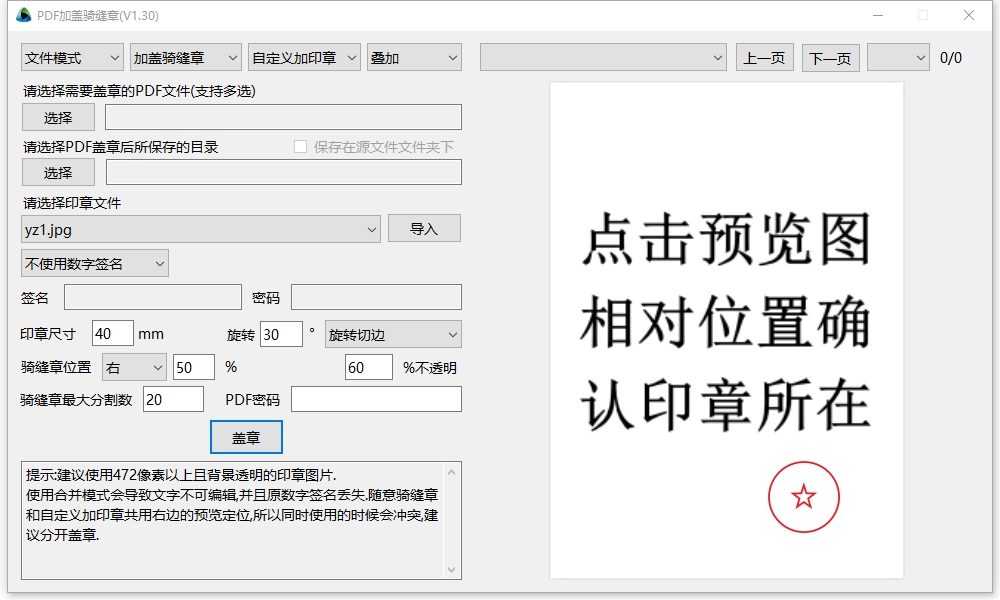
选择需要盖章的PDF文件或文件夹。
Select the PDF file or folder that needs to be stamped.
选择保存文件夹。
Select the save folder.
导入完整的印章图片,工具会根据PDF页数做随机分割。
Import a complete seal image; the tool will randomly split it according to the number of PDF pages.
设定印章大小,骑缝章位置,印章位置等
Set the seal size, cross-page seal position, seal position, etc.
点盖章,骚等后在保存文件夹中即可看到盖好骑缝章的PDF文件。
Click Stamp, wait a moment, and you will see the PDF file with the cross-page seal in the save folder.
本站暂未托管安装包
